
Your devices like laptops, phones, and tablets are the front doors to your organisation’s important data. If they are not protected, anyone could get in.
That is why endpoint security is more than just IT work. It is essential for keeping your organisation safe from threats like ransomware and data theft. The good news is securing your devices is doable. With the right steps, you can protect your organisation and feel confident.
In this article, we will walk through everything you need to know to strengthen your endpoint security from knowing what you have, to locking it down and staying compliant. Plus, you will get best practices and tips to help you along the way.
Why Endpoint Security Matters More Than Ever
Before diving into the how, let’s talk about the why.
Endpoints are often the easiest target for cybercriminals. Why? Because they are numerous, diverse, and sometimes outside of direct IT control.
Think about:
- Remote employees working from personal devices
- Contractors accessing corporate networks
- Mobile devices connecting over insecure Wi-Fi
Every device connected to your network is a potential entry point for attackers.
According to recent cybersecurity reports, over 70% of breaches originate at endpoints. Hackers exploit vulnerabilities like outdated software, weak passwords, or phishing attacks targeting users.
The impact of a successful endpoint breach can be devastating:
- Loss of sensitive customer or business data
- Ransomware locking down critical systems
- Costly downtime affecting productivity and revenue
- Damage to reputation and trust
So, protecting your endpoints is not just about technology it is about safeguarding your entire business.
Best Practices for Endpoint Security
| Practice | Why It Matters | How to Do It |
| Baseline Assessment | Know what you need to protect | Conduct regular inventories of all endpoints |
| Comprehensive Asset Register | Keep track of devices and owners | Use spreadsheets or asset management tools |
| Firewall & EDR Deployment | Block threats and detect breaches | Choose solutions that fit your environment |
| Regular Patch Management | Fix vulnerabilities promptly | Automate updates and monitor patch status |
| Governance & Compliance Docs | Meet regulations and prepare audits | Develop and update clear security policies |
| Employee Awareness Training | Humans are the first line of defence | Run phishing simulations and security workshops |
| Use of CMDB | Centralize asset info and relationships | Implement a CMDB tool suitable for your business |
Step One: Know What You Have, Baseline Boost & Asset Check
Imagine trying to secure a building without knowing how many doors or windows it has. That is what managing endpoint security without an asset register is like.
What is a Baseline Boost/Assessment?
A baseline boost/assessment is the process of taking stock of all your current endpoint devices and their security posture. This means understanding:
- What devices are connected to your network (laptops, desktops, mobile phones, IoT devices)
- The operating systems and software they run
- Their current security status (antivirus, firewall, patch levels)
- Who owns or uses each device
Why It is Crucial
Without this clarity, you are leaving gaps in your defence. Unknown or unmanaged devices can become unmonitored gateways for attackers.
Building Your Asset Register
Your asset register is the document (or database) where you keep all this information organised. It is a living record that includes:
- Device type and model
- Operating system version
- Installed software and security tools
- Owner or user details
- Location (office, remote, etc.)
- Last update or patch applied
How to Build It
- Start Small: For smaller teams, a well-maintained spreadsheet can do the trick.
- Automate: As you grow, consider automated tools like IT Asset Management (ITAM) systems or a Configuration Management Database (CMDB) to keep this updated in real-time.
- Regular Updates: Schedule quarterly or monthly reviews to catch new devices or changes.
Tip: Tools like ServiceNow CMDB or Lansweeper can scan your network and automatically update asset records, saving time and reducing errors.
Step Two: Lock It Down Firewall & EDR Power-Up
Knowing what you have is just the first step. Next up is making sure your devices are protected with the right tools.
Firewalls: Your First Line of Defence
Think of a firewall as a gatekeeper that controls what traffic can enter or leave your network. Firewalls inspect incoming and outgoing data packets and block anything suspicious.
There are different types:
- Network firewalls: Protect the perimeter of your network
- Host-based firewalls: Installed on individual endpoints for device-level control
Endpoint Detection and Response (EDR)
While firewalls block many threats, some malicious activity can sneak through. That is where EDR solutions shine.
EDR tools continuously monitor endpoint activity, looking for unusual behavior like:
- Unexpected file changes
- Suspicious network connections
- Unauthorized user actions
When something suspicious is detected, EDR can alert your security team and even automatically isolate the device to stop the threat from spreading.
Best Practices for Deployment
- Choose solutions that integrate well with your existing tools.
- Deploy both network and host firewalls for layered protection.
- Ensure EDR is configured for real-time monitoring and quick response.
- Regularly update firewall rules and EDR signatures.
Getting Help
Deploying firewalls and EDR can be complex, especially across diverse device types and locations. Consulting experts can help design and implement the right solution tailored to your business needs.
Step Three: Audit-Ready Compliance Kit
Security is not just about tech it is also about policies, people, and processes.
Why Governance Matters
Governance means having clear rules and responsibilities around endpoint security. Who is responsible for updates? How are incidents handled? What training do users receive?
Compliance Requirements
Depending on your industry, you may need to comply with regulations like:
- GDPR (data protection)
- HIPAA (healthcare)
- PCI DSS (payment cards)
- ISO 27001 (information security)
Having proper documentation helps prove you are following these rules and prepares you for audits.
What Documentation Should You Have?
- Endpoint security policies
- Incident response plans
- Patch management schedules
- User access and authentication policies
- Audit logs and compliance reports
Keeping It Ready
Governance and compliance docs should not be a one-time effort. Regularly review and update them to keep pace with evolving threats and regulations.
Key Documents Required for Compliance
| Policy | Description | ISO 27001 | Sign-off | Notes |
| Asset Inventory Register | Tracks all endpoints (laptops, mobiles, servers) | ✔️ Annex A.8 | Required to demonstrate control over hardware/software assets | Asset Inventory Register |
| Endpoint Security Policy | Governs AV, EDR, patching, hardening, access controls | ✔️ A.5, A.13 | Must define control objectives and user responsibilities | Endpoint Security Policy |
| Access Control Policy | Defines least privilege, MFA, and RBAC | ✔️ A.9 | Required for managing logical access to systems | Access Control Policy |
| Acceptable Use Policy (AUP) | Outlines what employees can/cannot do on endpoints | ✔️ A.5 | Forms part of user onboarding/offboarding & audit reviews | Acceptable Use Policy (AUP) |
| Configuration & Hardening Standards | OS and device-specific hardening baselines | ✔️ A.12 | Aligned with CIS Benchmarks, applied via GPO/MDM | Configuration & Hardening Standards |
| Patch Management Procedure | Defines frequency, responsibility, and tracking | ✔️ A.12.6 | Should show logs and timelines of updates | Patch Management Procedure |
| Incident Response Plan (IRP) | Details roles, triage steps, escalation, and response timelines | ✔️ A.16 | Needed for ISO audits and essential for SOC 2 security breach response | Incident Response Plan (IRP) |
| Security Awareness Training Records | Proves staff were trained on endpoint security basics | ✔️ A.7, A.8 | Should include phishing simulations, quizzes, signoffs | Security Awareness Training Records |
| Monitoring & Logging Policy | Describes what is logged (EDR, endpoint activity) and how it is reviewed | ✔️ A.12.4 | Should link to SIEM or central log repository | Monitoring & Logging Policy |
| Data Encryption & Handling Policy | Ensures endpoint encryption and media handling | ✔️ A.10 | Include USB blocking rules, removable media controls | Data Encryption & Handling Policy |
| Change Management Procedure | How endpoint-related changes are reviewed and approved | ✔️ A.12.1.2 | Required by CMMI L3 and all audits | Change Management Procedure |
| Risk Assessment Report (Endpoint) | Assesses endpoint-related risks, mitigations, and residual risk | ✔️ A.6 | Maps threats to controls; forms part of risk register | Risk Assessment Report (Endpoint) |
| Audit Trail Reports / Logs | Shows endpoint activity, patch status, AV/EDR logs | ✔️ A.12.4 | Must be retained and regularly reviewed | Audit Trail Reports / Logs |
| Vendor Management Policy | Covers endpoint protection vendors (EPP, EDR, MDM) | ✔️ A.15 | Required if vendors provide tools/services handling endpoint data | Vendor Management Policy |
| Policy Review & Approval Log | Documents periodic review and approval of all above policies | ✔️ A.5.1.2 | Must show management sign-off and revision tracking | Policy Review & Approval Log |
The Secret Weapon: Using a CMDB to Manage Endpoints
Managing hundreds or thousands of devices is no easy feat. A Configuration Management Database (CMDB) can be a game changer.
What is a CMDB?
A CMDB is a centralized database that stores detailed information about all your IT assets and their relationships.
It is like a master map that shows:
- What devices you have
- How they are connected
- Who owns them
- Their security status
Why Use a CMDB?
- Faster Incident Response: Quickly identify affected devices during a breach.
- Better Change Management: Understand what might break when you update or replace a device.
- Simplified Audits: Easily generate reports for compliance checks.
- Improved Asset Visibility: Know exactly what is on your network at any time.
Popular CMDB Tools
- ServiceNow CMDB – robust and widely used in enterprises.
- Freshservice – easy to use, cloud-based.
- Device42 – infrastructure-focused.
- Open-source options – like i-doit or CMDBuild for smaller budgets.
Costs and Considerations
CMDB tools vary in price, from free open-source versions to enterprise-grade platforms costing thousands annually. The right choice depends on your size, needs, and budget.
Bonus Tip: Do not Forget Your People
Even the best tech can be undone by human error. Educate your team on cybersecurity best practices:
- Spotting phishing attempts
- Using strong, unique passwords
- Reporting suspicious activity immediately
Regular training helps turn your staff from potential weak points into your strongest defence.
Wrapping It Up
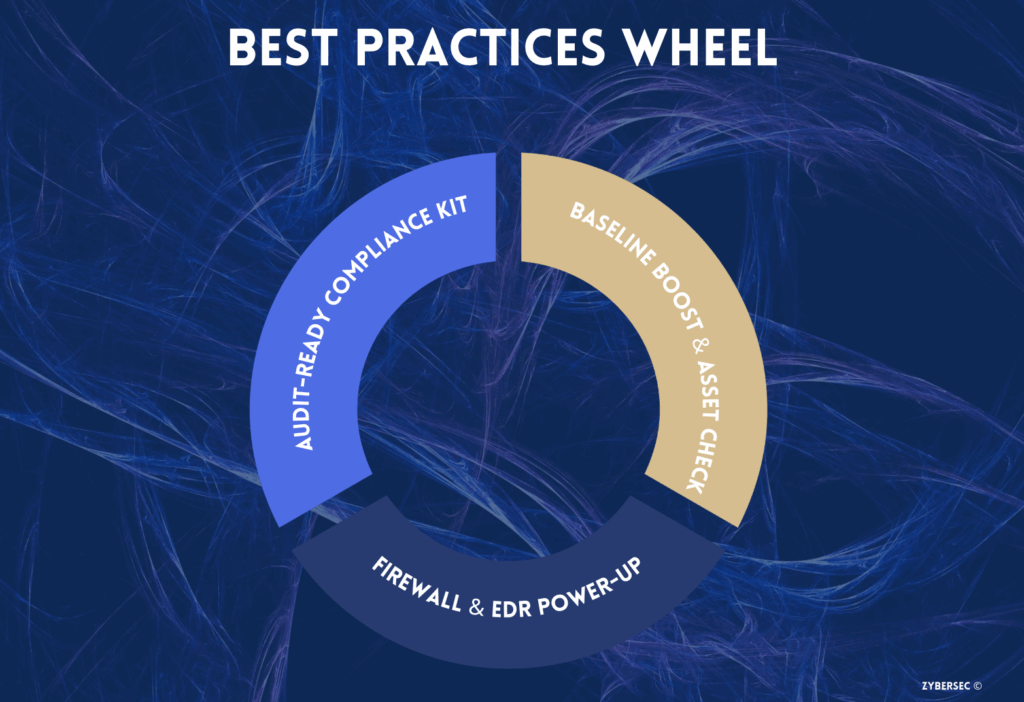
Endpoint security might sound overwhelming, but it really boils down to three core things:
- Know your Assets – Baseline Boost & Asset Check
- Lock down Defences – Firewall & EDR Power-Up
- Stay Organized and Compliant – Audit-Ready Compliance Kit
If this sounds like a lot to manage, you are not alone. Many businesses benefit from professional endpoint security consulting that guides them every step of the way.
Your endpoints are your business’s gateways let’s keep them secure, strong, and ready to fend off whatever threats come knocking.